
macOS & Windows

Thousands of legal documents.
AI reads, finds, and answers.

Your files are never uploaded. Everything stays on your machine — nothing sent without your consent.

Runs only on your PC Nothing sent without consent Offline AI support

hero-main.webp

Secure on your PC

All data stored locally Nothing sent without consent Offline AI inference AES-256 encryption PII masking OS Keychain storage Air-gap mode No usage data collected All data stored locally Nothing sent without consent Offline AI inference AES-256 encryption PII masking OS Keychain storage Air-gap mode No usage data collected

Sound familiar?

"Can't find the relevant clause across hundreds of files"

Ask a question and AI finds relevant documents with page numbers. No need to know exact keywords — semantic search handles it.

"Can't upload client documents to the cloud"

All data stays on your PC. Nothing leaves your machine unless you allow it, and AI works without internet.

"Worried about sensitive info leaking to AI services"

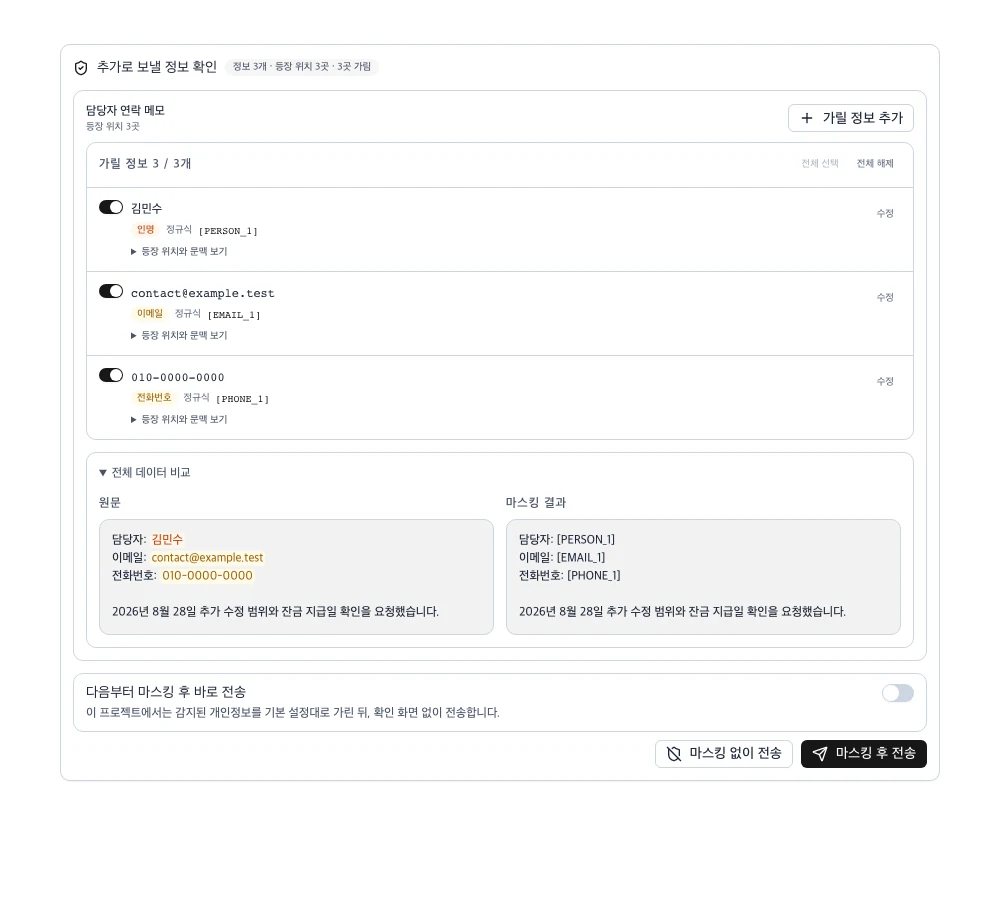
When using cloud AI, personal information is detected and masked after your review before transmission. Air-gap mode can block all external communication entirely.

See it in action

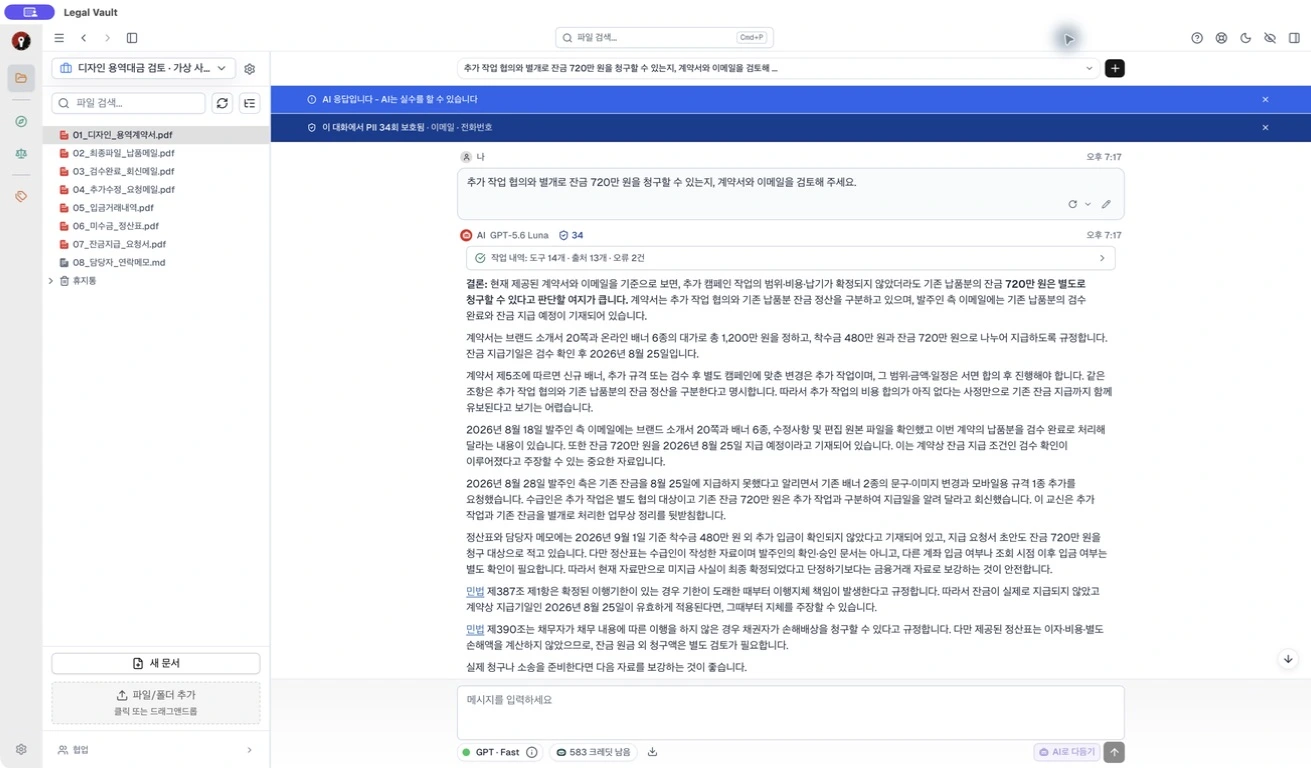
feature-ai-chat.webp

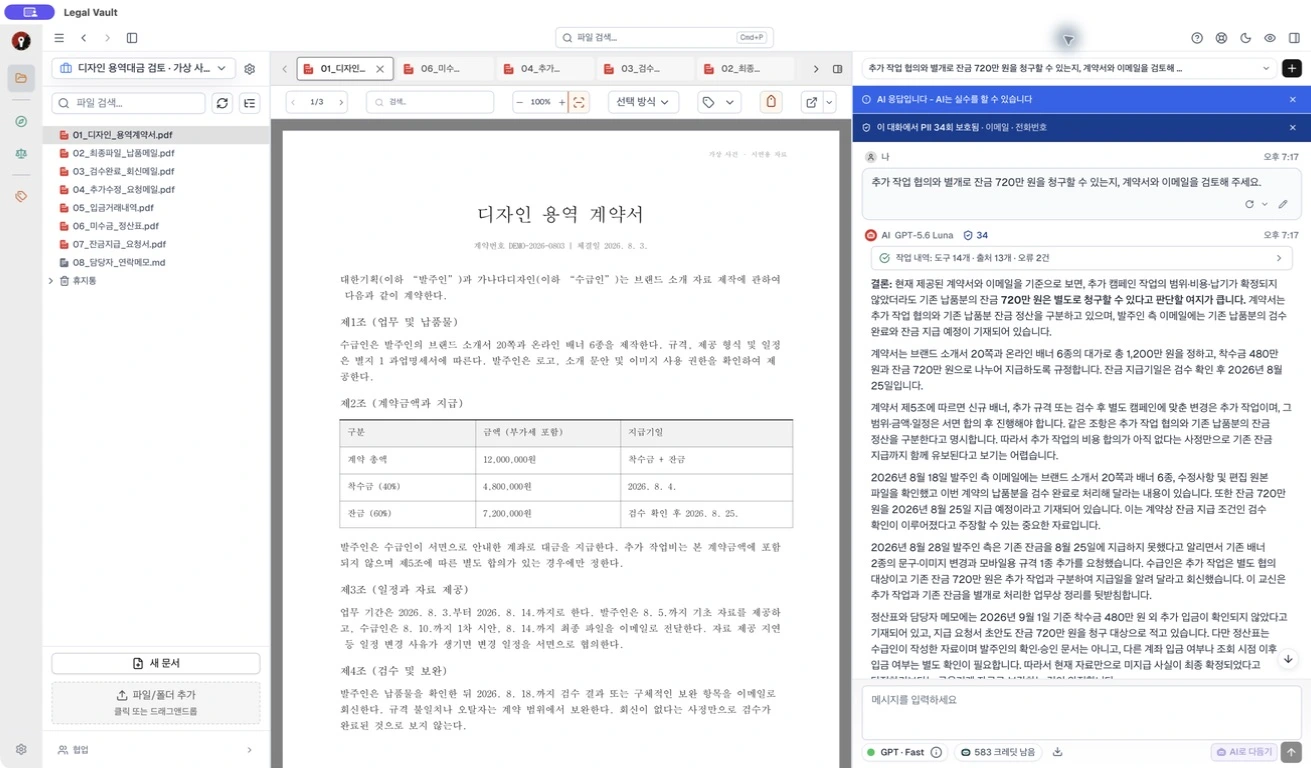
feature-search.webp

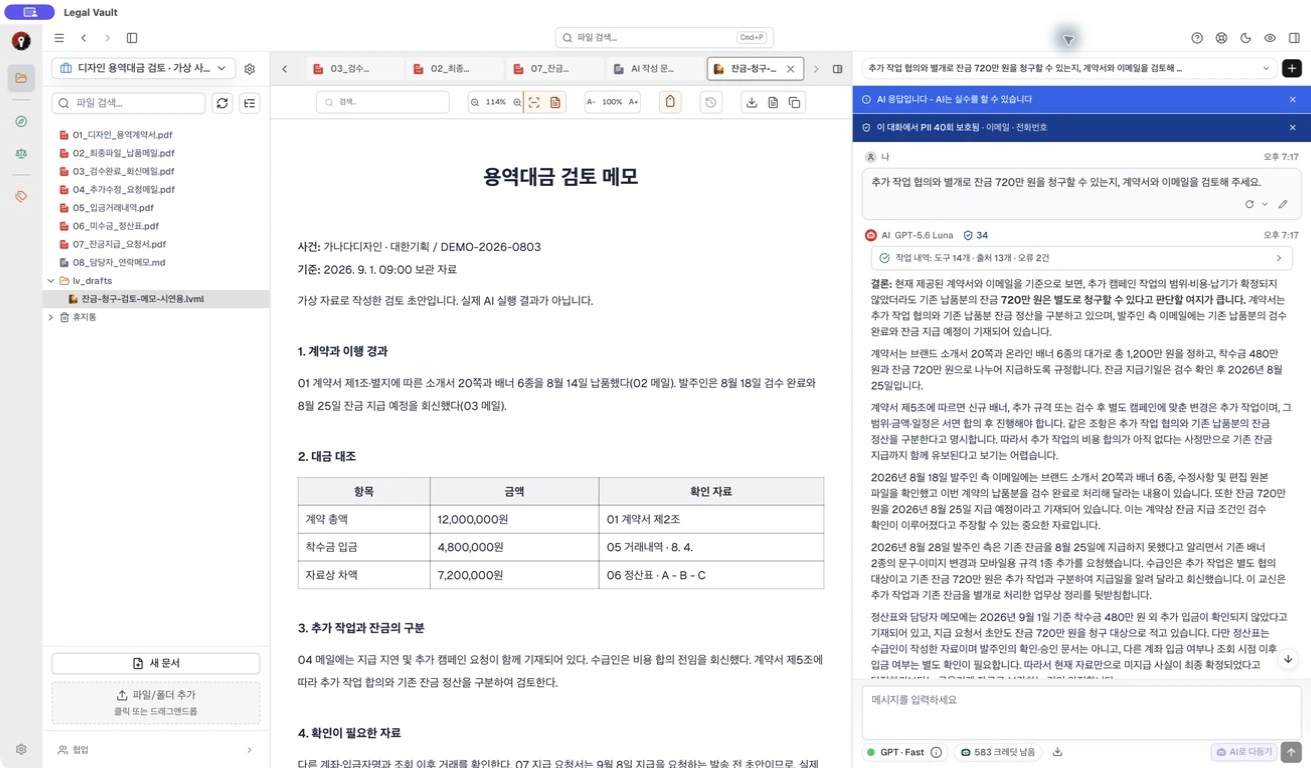
feature-viewer.webp

feature-pii.webp

Reads your documents and answers with citations — on your PC

What Legal Vault gives you

Your PC is your server

Documents, indexes, and AI models all stay on your computer. Nothing leaves your machine unless you allow it. API keys are stored safely in your OS Keychain.

Works without internet

Local AI models enable search and Q&A even offline. Turn on air-gap mode to block all external communication entirely.

Ask and it finds the answer

AI reads your documents and points to relevant clauses and precedents with citations. Ask "What are the liability clauses in this contract?" and it pinpoints the exact page.

Your sensitive data stays protected

When using cloud AI, personal info like ID numbers and phone numbers is detected. You review the masking preview before anything is sent — full control over what leaves your machine.

Look up statutes and case law in-app

Integrated with Korea's National Law Information Center (law.go.kr) — search statutes, case law, and constitutional decisions right alongside your documents.

Fast hybrid search across thousands

Combines keyword search with AI semantic search for fast results. Find what you need with natural language — no exact terms required.

See it in action

01

Find the key facts in hundreds of case files

A lawyer asks "What evidence relates to the opposing party's fault in this case?" — AI responds with 3 relevant documents and page numbers. All processing happens on your PC.

AI chat finding answers from legal documents

02

Cross-analyze case law with your documents

Search Korea's National Law Information Center for precedents and compare them side-by-side with your case materials to organize key issues.

Search results alongside external law panel

03

Work offline on the go

Search documents and run AI Q&A with local models — no internet needed. Use it in secure networks or on business trips without restrictions.

Working with local AI in offline environment

Secure on your PC

In legal work, privacy isn't optional

0bytes

default external transmission

AES-256

shared file encryption

100%

user control

Nothing leaves without your permission

Cloud AI and external law lookups do not activate until you explicitly allow them. No usage data is collected.

Review before sending

When using cloud AI, personal information is detected and a masking preview is provided. Nothing is sent until you confirm.

Full network lockdown available

Air-gap mode blocks all external network communication. API keys are stored safely in your OS Keychain.

Compare plans

Choose the plan that fits your needs

Free Trial

No credit card required

₩0 14 days
  • Full Solo Full experience
  • Unlimited local AI
  • 8 Cloud AI units included
  • No credit card needed
Start for free

Solo Base

Individual — Software

₩39,900 /mo
  • Unlimited documents
  • RAG search · citation analysis
  • PII masking
  • AI add-ons available
Get started
Recommended

Solo Full

Individual — Local + Cloud AI

₩109,900 /mo
  • Everything in Solo Base
  • Unlimited local AI (Gemma 4)
  • 800 Cloud AI units/mo
Get started

Organization Enterprise: contact us

All prices include VAT (10%) · 10% off with annual billing

Frequently asked questions

Are my documents sent to external servers?
No. All documents and indexes stay on your PC. Cloud features are disabled by default, and air-gap mode can block all external communication entirely.
Can I use it without internet?
Yes. Local AI models enable search and Q&A offline. Only cloud AI (Claude) and statute lookup features require internet.
Is my data safe when using cloud AI?
When using cloud AI, personal information is detected and a masking preview is shown. Nothing is sent until you review and confirm.
What file formats are supported?
PDF, DOCX, HWP/HWPX, XLSX, PPTX, RTF, HTML, CSV, TXT, EPUB, and more — over 15 formats. Scanned PDFs are processed with OCR.
What's the difference between Free and Pro?
Free includes 100 documents and 50 lifetime Claude calls. Starter (₩14,900/mo) adds unlimited documents and 150 Claude calls/month. Pro adds PII masking and statute/case law search. Team and Enterprise add team sharing and audit logs.
Does it integrate with existing document management systems?
Legal Vault works with local folders. Simply connect your existing folders and indexing starts automatically. No migration needed.

Get started for free

Install and start using immediately. No account or payment required.

Installed on your PC. Runs on your PC.